Gitloom — Rebuilding Git, Mostly to See What Breaks
Gitloom is a tiny, intentionally limited version control system written in Go. It exists for one reason: curiosity. I wanted to understand what Git actually does behind the scenes, and the fastest way to do that seemed to be rebuilding a very small, very incomplete version of it.
This is not an attempt to compete with Git. Git has had years of careful design, battle testing, and contributors far smarter than me. Gitloom, on the other hand, has me, a text editor, and a willingness to break things in the name of learning.
Why Build This at All?
Git is one of those tools that feels obvious after you understand it—but opaque right up until that point. I found myself using commands fluently while only vaguely understanding what they translated to internally.
So instead of reading more blog posts about Git internals, I decided to build something that would force the answers out of me:
- What actually happens during git init?
- How are files stored, hashed, and retrieved?
- What do blobs, trees, and commits look like when they’re not diagrams in a blog post?
Gitloom is the result of that exploration—part experiment, part learning aid, part “let’s see if this works.”
What Gitloom Currently Does?
Gitloom supports a small set of Git-like commands. Each one exists because I wanted to understand that specific piece of Git.
1. Initializing a Repository
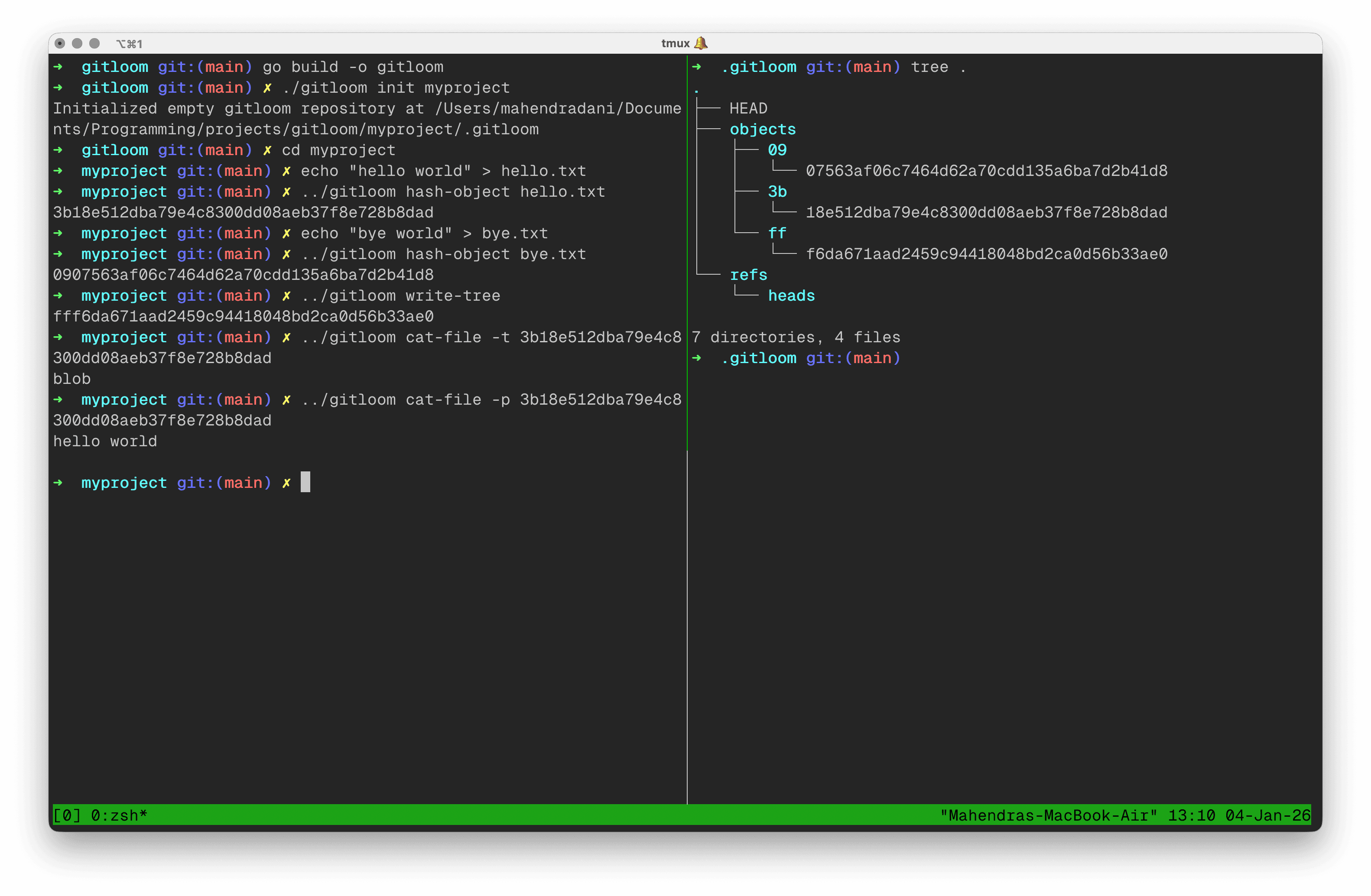
gitloom initThis sets up a minimal repository structure:
.gitloom/.gitloom/objects/.gitloom/refs/.gitloom/HEAD
Checkout out the demo.
2. Turning Files into Objects
gitloom hash-object <file>This command:
- Converts a file into a blob
- Prepends the familiar
blob <size>\0header - Computes a SHA-1 hash
- Compresses and stores the object in:
.gitloom/objects/<hash_prefix>/<hash_suffix>
I've written more on the types of objects in Git, read here.
3. Inspecting Objects
gitloom cat-file -[p|s|t] <hash>This lets you:
- View the object contents
- Check its size
- Identify its type
It reads objects using buffered I/O and behaves very similarly to Git’s own cat-file, minus decades of polish and edge-case handling. Checkout out it action.
4. Writing Trees from Directories
gitloom write-treeThis walks the directory recursively, hashes files and subtrees, and writes a tree object representing the current state.
Footnote
Gitloom made me appreciate Git not as a mysterious tool, but as a collection of simple ideas assembled with incredible care. Rebuilding even a small subset of it makes you realize how much thought lives under everyday commands.
I’ll keep extending it as long as curiosity keeps pulling me forward. If nothing else, it has already done its job: Git no longer feels like magic—just very good engineering.
You can explore the project on GitHub or follow updates as they happen on X(twitter).