How to commit using GitHub Actions?
September 24, 2026 | 11:45 AM
actions/checkout@v4, remember? it's in every GitHub action, yet overlooked. Turns out github actions can be used to write to your repository and even commit it.
I was reading Simon's blog on a scraping technique he calls git-scraping when I realized that he directly commits the scraping results into his repositories using github actions.
There's one step that I've seen in many actions but never really paid attention to - actions/checkout. It's setting up the repository locally in the action's Runner, which means that the runner clones the repository before executing any further steps defined in the action. That's the catch!
So, I came up with an idea to try this out: "Can I write an action to log it's execution time to a file within the repo and commit it directly?" Yes!!
name: Log Github Action run times

on:
workflow_dispatch:
schedule:
    - cron: "*/7 * * * *"

permissions:
contents: write

jobs:
scheduled:
    runs-on: ubuntu-latest
    steps:
    - name: Checkout repo
        uses: actions/checkout@v7

    - name: Configure git for commits
        run: |-
        git config --global user.name "Automated Monkey"
        git config --global user.email "actions@users.noreply.github.com"

    - name: Log execution time
        run: |-
        timestamp=$(date -u)
        echo "Executed: ${timestamp} by ${{github.run_id}}" >> actions-log.txt

    - name: Commit changes
        run: |-
        git add .
        timestamp=$(date -u)
        git commit -m "Update latest execution run: ${timestamp}"
        git push
This action runs every 7 mins (but does it?), configures git with name as "Automated Monkey" (yep, that's the best I could think of!) and github's email. It appends a single line of text to action-log.txt with it's run time and run_id. Finally it directly commits the changes to the repo!
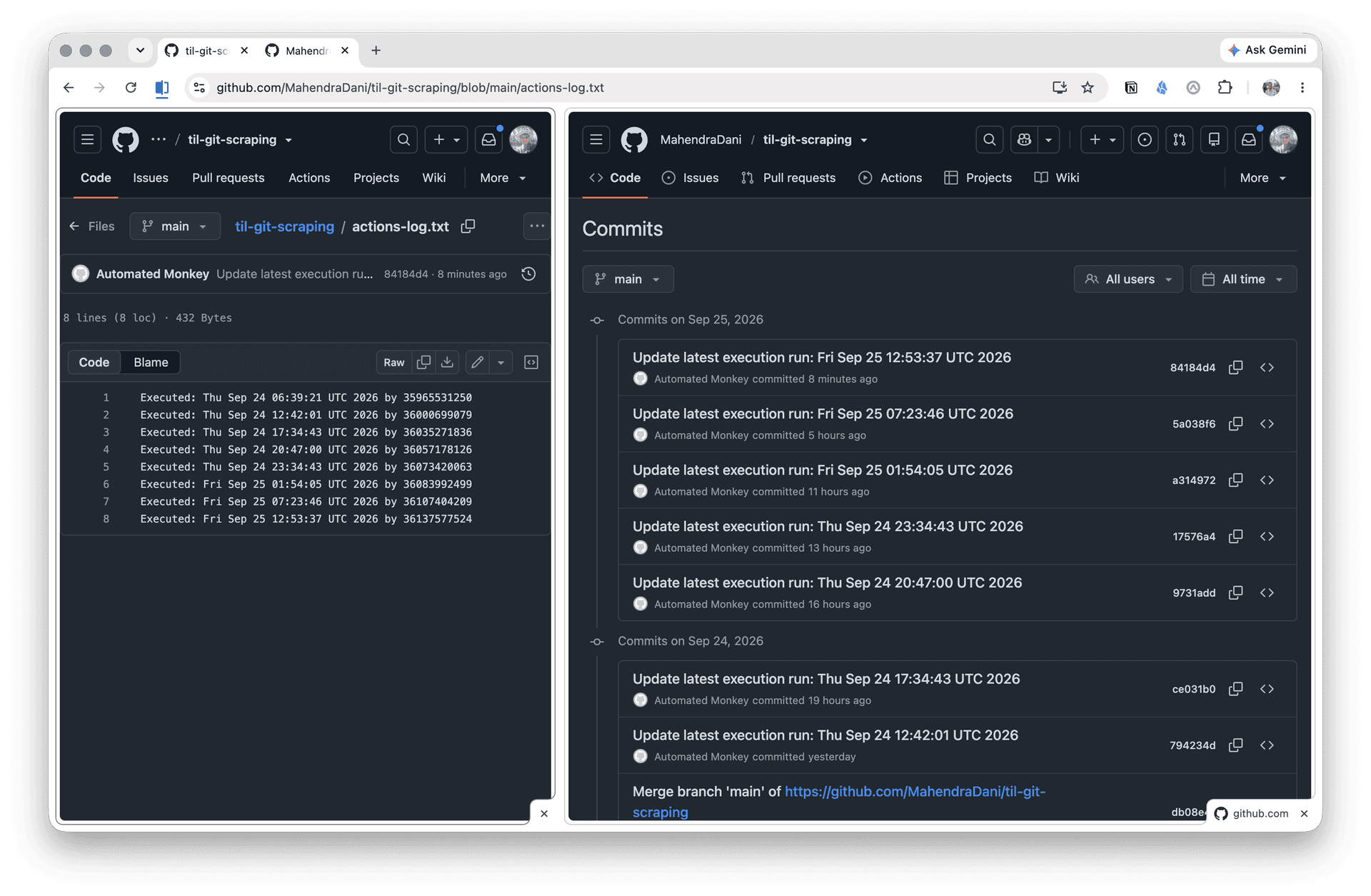
On the left tab view, you can see the actions-log.txt file having each execution log and on the right tab you can see the corresponding commits made directly by the corresponding github action (Automated Monkey!).
Fin
If you take a good look at the action and the commits from the above screenshot, you'd expect the action to have way more runs, right? I configured the action to run on schedule every 7 minutes everyday, but it didn't why? Turns out, GitHub actions on free tier don't run exactly at the schedule!